Automation · 8 min read
AI automation for small teams: automate routing, not judgement
The version of AI that actually helps a six-person business is boring. Nothing gets lost, everything reaches the right person quickly, and the first draft is already written when someone sits down. That is most of the value, and it does not require betting your reputation on a model.
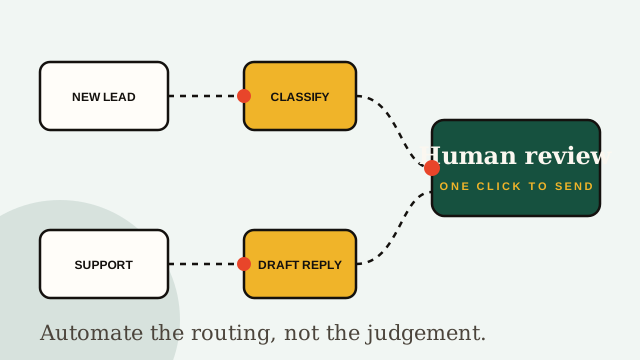
The line that matters: routing versus judgement
Almost every automation decision gets easier once you sort the task into one of two buckets.
Routing is moving information to the right place: classifying an email, tagging a lead, pulling company details, assigning an owner, assembling a report from data that already exists. Getting it wrong is cheap and quickly visible. Automate this aggressively.
Judgement is committing your business to a position: quoting a price, promising a deadline, responding to a complaint, deciding whether to make an exception. Getting it wrong is expensive and sometimes invisible until much later. Keep a human here, permanently.
If a mistake would embarrass you in front of a customer, or cost money to unwind, it is judgement. Draft it automatically, send it manually.
Four workflows to automate first
In rough order of return for a team under about twenty people.
- Enquiry triage. Every inbound message gets classified by type and urgency, enriched with whatever public context is available, assigned an owner, and acknowledged. This is usually the single biggest win, because the failure it prevents — an enquiry sitting unread for two days — is pure lost revenue.
- Drafted first replies. Generate the response, then put it in a queue for one-click approval. Your team edits and sends instead of writing from scratch. Expect to cut response time substantially while keeping full control of the words.
- CRM hygiene. Deduplication, normalising company names, filling missing fields, flagging records that have gone stale. Nobody enjoys this, everybody neglects it, and neglecting it quietly corrupts every report you run.
- Reporting assembly. The weekly numbers pulled from your sources into one document, with the anomalies highlighted. The interpretation stays human; the copy-pasting does not need to be.
For the Kettle & Co project, those four things returned about nine hours a week to a team of four and took first response time from over a day to under two hours. No part of it was technically clever.
Two things to never fully automate
Anything a customer reads unreviewed. A model that is right ninety-five percent of the time still sends a wrong, confident message to one customer in twenty. At any real volume that is a weekly incident, and the damage lands on trust, which is the expensive thing to rebuild.
Pricing, promises and complaints. These require context that is not in your data: the relationship, what happened last time, what you can actually deliver next month. Automating them optimises for speed in the one place where speed is not the point.
Keeping the human step cheap
The usual objection is that a human approval step destroys the time saving. It does, if you implement it badly. Things that keep it fast:
- Batch it. One queue reviewed twice a day beats notifications all day.
- Approve in one click, from where you already work. If it needs a new tab and a login, it will not get used.
- Show confidence and reasoning. Reviewers scan far faster when they can see why something was classified as it was.
- Auto-approve the genuinely trivial. Acknowledgements and internal routing do not need a human.
- Log the edits. Corrections are the training data for improving the prompts and rules next month.
Done properly, review takes a few minutes per batch and you keep both the speed and the safety.
How to tell whether it worked
Measure the operational outcome, not the volume of automation. Useful numbers:
- Time to first response, which is the one customers feel.
- Percentage of drafts sent without major edits — if this is low, the automation is creating work.
- Enquiries with no owner after an hour, which should be zero.
- Hours returned per week, estimated honestly with the team.
- Escaped errors — anything wrong that reached a customer. Target zero and investigate each one.
Where to start this week
Do not buy a platform yet. Spend an hour writing down every recurring task your team does, then mark each one as routing or judgement. Pick the single routing task that annoys people most and automate only that.
One working automation, understood by the whole team and documented well enough that someone else can change it, is worth more than a comprehensive system nobody trusts. Add the second one a month later.
If you would rather have it mapped with you, that is the automation service — we build it, document it in plain language, and hand over the keys so you are not dependent on us to change a rule.
Map your workflow with us
Tell us where your team is losing hours. We will sketch what we would automate first and what we would leave alone.