Performance · 9 min read
The Core Web Vitals checklist we run before every launch
Seventeen checks, one morning of work. On a typical marketing site this takes mobile Largest Contentful Paint from somewhere around three seconds to under 1.5 — and three of the checks do most of the work.
Why we treat this as acceptance criteria
Performance work has a habit of becoming a phase that never arrives. It gets written into the proposal as "optimisation", scheduled for the end, and then traded away when the launch date gets tight. Six months later somebody runs PageSpeed Insights, panics, and asks for a quote to fix it.
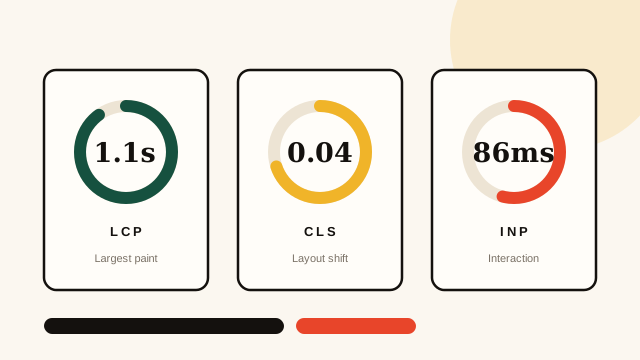
We avoid that by writing the numbers into the scope as pass-or-fail conditions. A build is not finished until mobile LCP is under 2.0 seconds, CLS is under 0.05 and INP is under 200 milliseconds on a throttled connection. If it misses, it is a bug, not a future project.
The useful mental shift: performance is not a score to improve, it is a budget to stay inside. Budgets get respected during the build. Scores get chased afterwards.
This matters commercially, not just technically. Core Web Vitals are a confirmed ranking signal, but the bigger effect is behavioural — every additional second before your main content appears costs you a slice of the people who were willing to read it.
The three fixes that do most of the work
If you only have an hour, do these. Across the last dozen sites we have audited, these three accounted for the clear majority of the improvement.
-
Serve the hero image properly. Correctly sized, in
AVIF or WebP, with explicit
widthandheight,fetchpriority="high", and crucially not lazy-loaded. A lazy-loaded hero image is the single most common self-inflicted LCP wound we find. -
Stop blocking render with fonts. Use
font-display: swap, preconnect to the font origin, subset to the characters you actually use, and self-host if you can. Then set a fallback stack with similar metrics so the swap does not cause a visible reflow. - Remove the third-party scripts nobody owns. Most sites carry two or three tags from an abandoned experiment. Audit what loads, delete what has no owner, and defer the rest. Marketing tags are frequently the largest single cost on the page.
Checks for Largest Contentful Paint
LCP measures when the largest visible element finishes rendering. In practice that is almost always your hero image or your headline.
- Identify the actual LCP element in DevTools rather than guessing at it.
- Preload the hero image and never lazy-load anything above the fold.
- Serve modern formats with a
<picture>fallback, and size variants for real breakpoints. - Inline the critical CSS needed for the first viewport; defer the rest.
- Preconnect to any origin that serves a render-critical asset.
- Check the server response time — if time to first byte is above 600ms, no front-end fix will save you.
- Make sure the page is cached at the edge and that HTML is not being regenerated per request unnecessarily.
Checks for Cumulative Layout Shift
CLS is the one that annoys users most and is usually the cheapest to fix. Nearly every cause is a box whose size was not reserved.
- Every image and video has explicit dimensions or an
aspect-ratio. - Ad slots, embeds and iframes have reserved space at every breakpoint.
- Banners and cookie notices are overlaid, never inserted into the flow.
- Fonts have metric-compatible fallbacks so the swap does not reflow text.
- Nothing animates
top,left,widthorheight— usetransforminstead.
Checks for Interaction to Next Paint
INP replaced First Input Delay and is a much harder test: it measures responsiveness across the whole visit, not just the first tap.
- Break long JavaScript tasks up; anything over 50ms is a problem.
- Ship less JavaScript. Code-split by route and drop polyfills for browsers you do not support.
- Keep the main thread free during hydration — stream, or hydrate progressively.
- Debounce expensive input handlers, especially search and filter fields.
- Use CSS for animation and state changes wherever it is possible.
Two things we stopped bothering with
Both of these get recommended constantly and, in our experience, buy almost nothing on a normal marketing site.
Chasing a perfect 100 in Lighthouse. The last few points usually cost a disproportionate amount of engineering time and reflect lab conditions rather than real visitors. We aim for 90-plus on mobile and then look at field data instead.
Aggressive resource hinting everywhere. Preloading a dozen assets makes them compete with each other and can make LCP worse. Preload the one or two things that genuinely block the first paint, and leave the rest to the browser, which is better at prioritising than we are.
How to measure it honestly
Lab tools are for diagnosis; field data is for truth. Lighthouse on a fast laptop over office wifi will tell you a comforting lie.
- Test on a throttled 4G connection with CPU throttling at 4x.
- Test the pages people actually land on, not just the home page.
- Check the Chrome User Experience Report in Search Console for real-world numbers.
- Watch the 75th percentile, not the average — Core Web Vitals are assessed that way.
- Re-measure after every content change, because a new hero image can undo a month of work.
None of this is exotic. It is a checklist, and the value is in running it every time rather than knowing it exists. We keep ours in the definition of done for each build, which is the only reason it actually gets done.
If you want us to run it against your site, that is part of the web development service — or just send us the URL and we will tell you what we would fix first.
Want this run on your site?
Send us a URL. We will reply with the three things costing you the most, free, whether or not you hire us.